
Guide to remove ViaAds

Shopify - Remove App
- Log in to the Admin panel
- Select Apps, and the search field is pre-filled with Apps
- Select Apps and sales channel settings
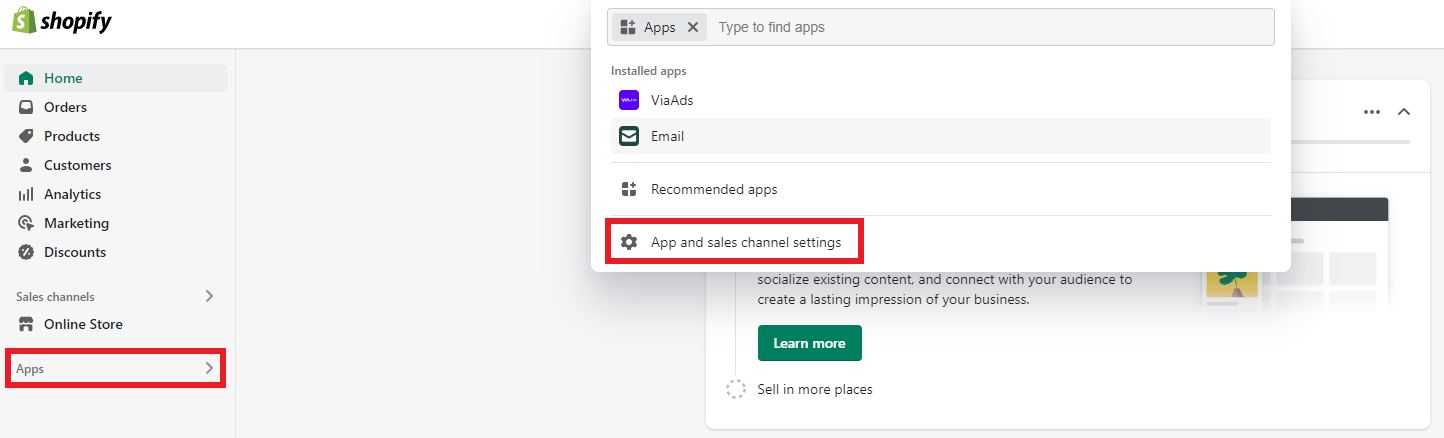
- A pop-up has now opened with a list of installed apps
- Find ViaAds in the list and select Remove
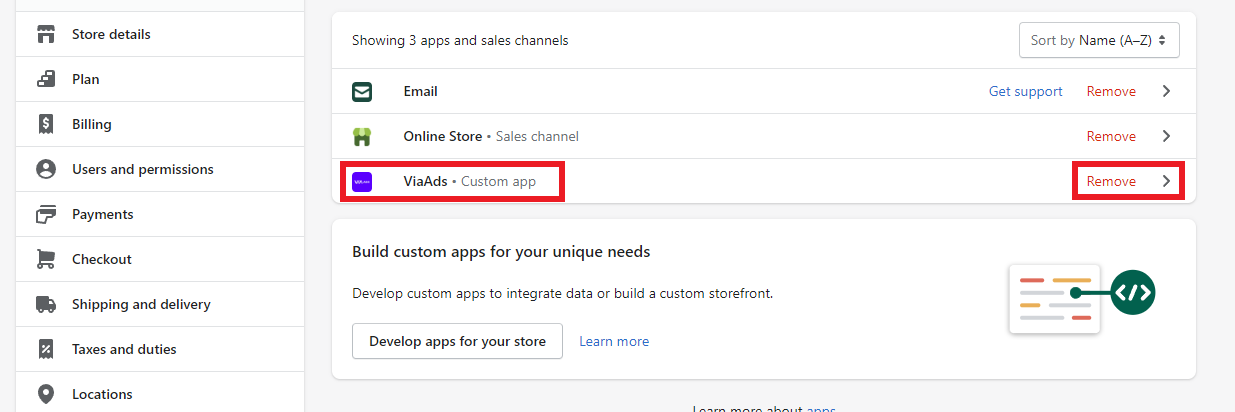
- A new pop-up now opens
- Select Delete to confirm the removal of the ViaAds App
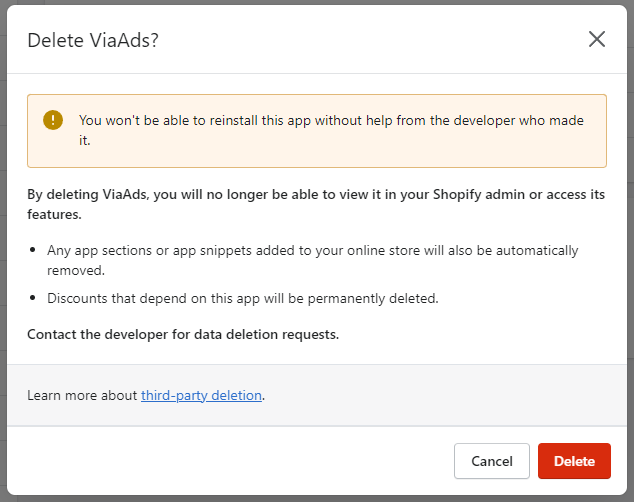
The ViaAds App is now uninstalled and removed from Shopify.
Shopify - Remove Script
If the script was added in Cookie Information:
- Log in at app.cookieinformation.com
- Select the domain of the webshop the ViaAds script is to be removed from
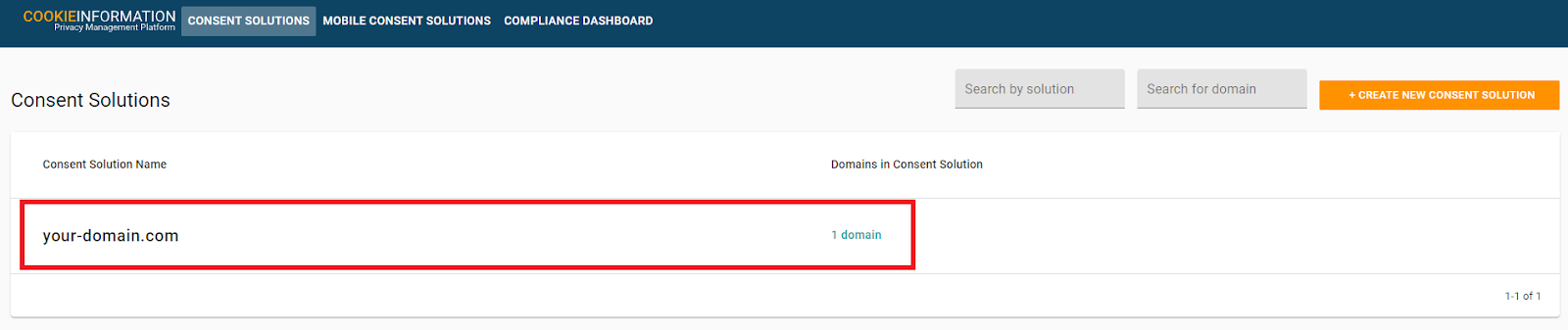
- Select Pop-up
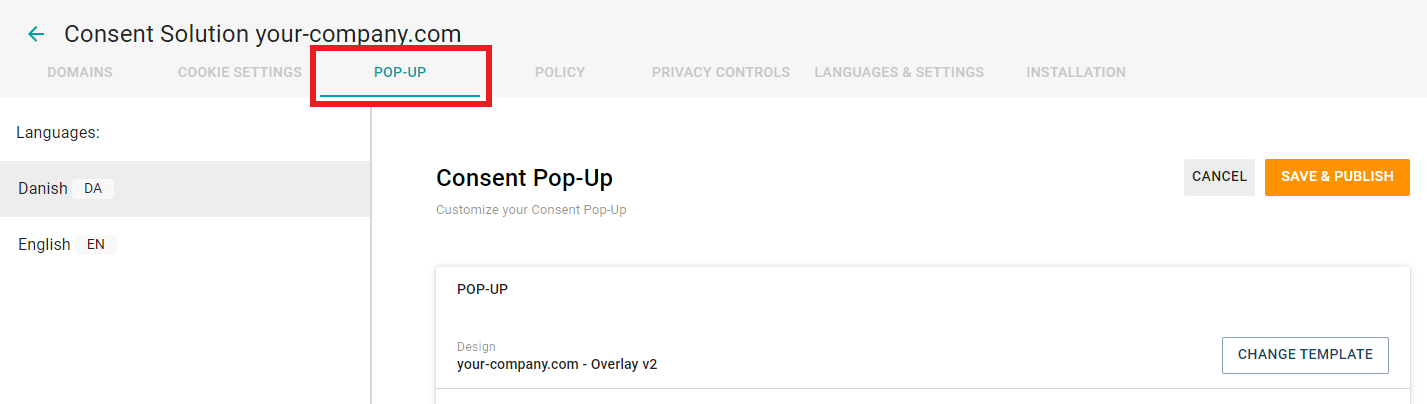
- Scroll down and click Advanced Settings
- Then scroll further down to the bottom of the page and find Javascript functions
- Scroll to the bottom of Javascript functions
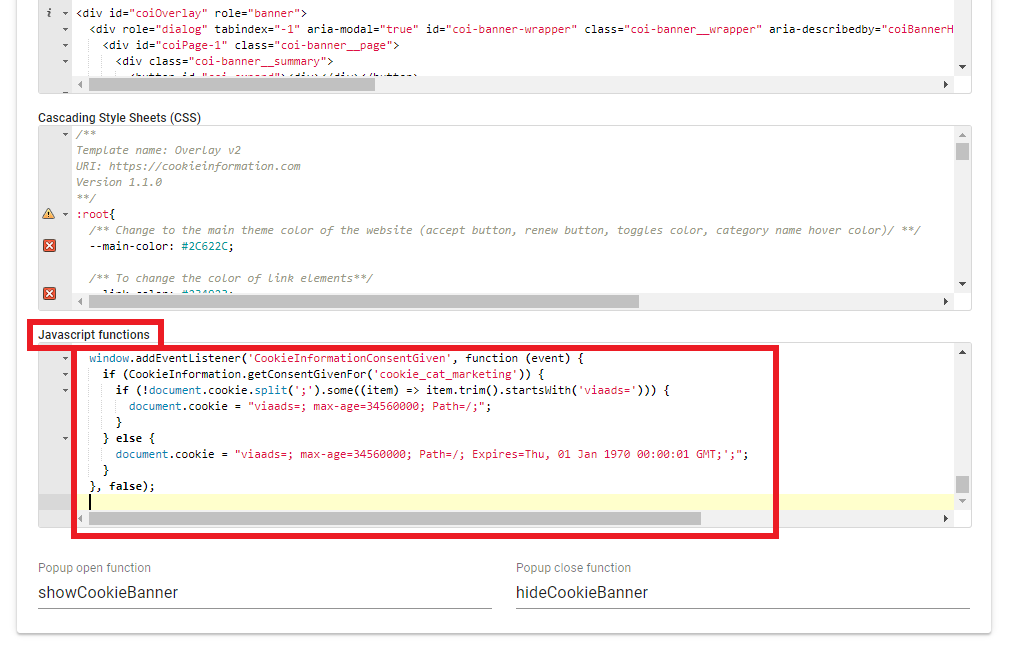
- Now remove the following code snippet just above this line (if other functionality has been added here, you will need to search for the snippet and then remove it):
window.addEventListener('CookieInformationConsentGiven', function (event) { if (CookieInformation.getConsentGivenFor('cookie_cat_marketing')) {if (!document.cookie.split(';').some((item) => item.trim().startsWith('ViaAds='))) { document.cookie = "ViaAds=; max-age=34560000; Path=/;"; } } else { document.cookie = "ViaAds=;; Path=/; Expires=Thu, 01 Jan 1970 00:00:01 GMT;';"; } }, false);
- Scroll to the top of the page and select Save & Publish
- A pop-up opens with the text "Are you sure you want to save and publish changes?" Click Save
The ViaAds script is now removed from the webshop.
If the script was added in the Shopify theme file, do the following:
- Select Themes in the menu under Online Store
- Select Customize under Current Theme
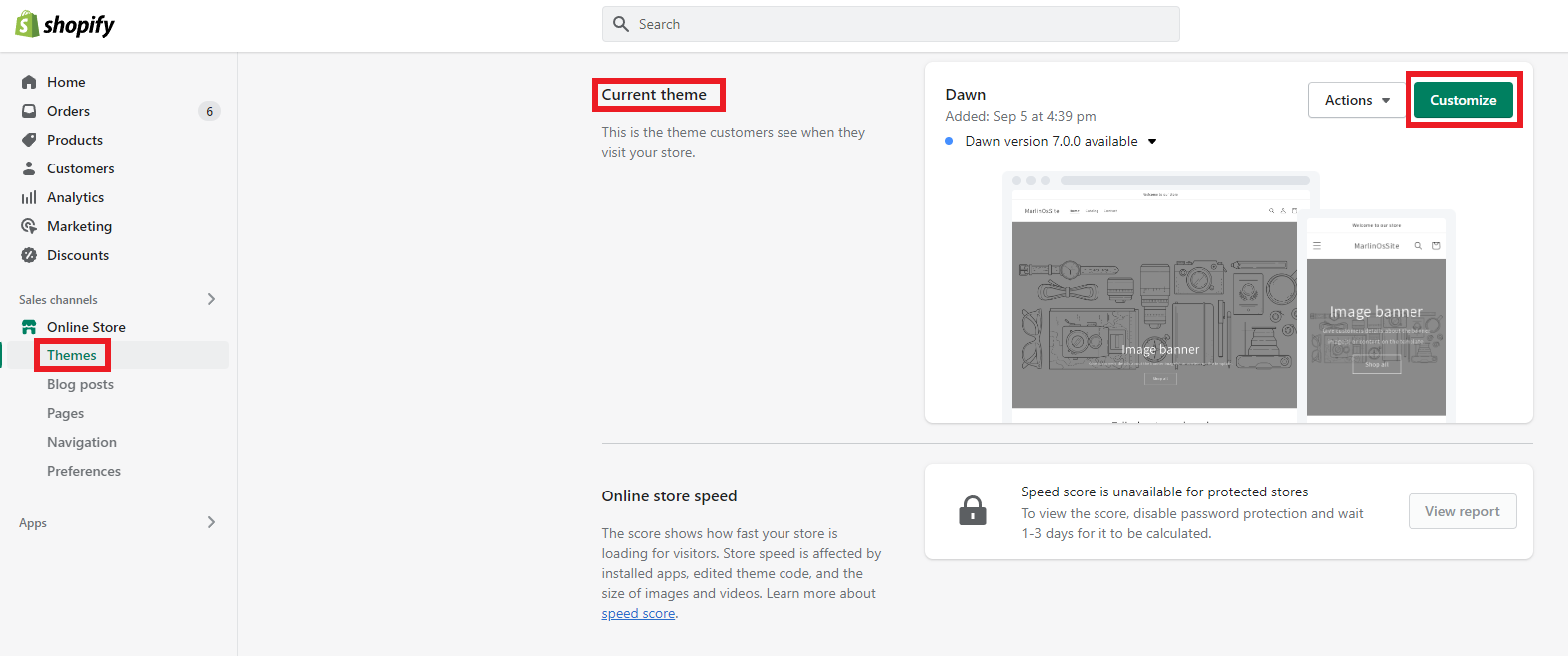
This opens the Theme Editor, where the current theme can be edited.
- Select the 3 dots in the top left-hand corner
- Select Edit Code
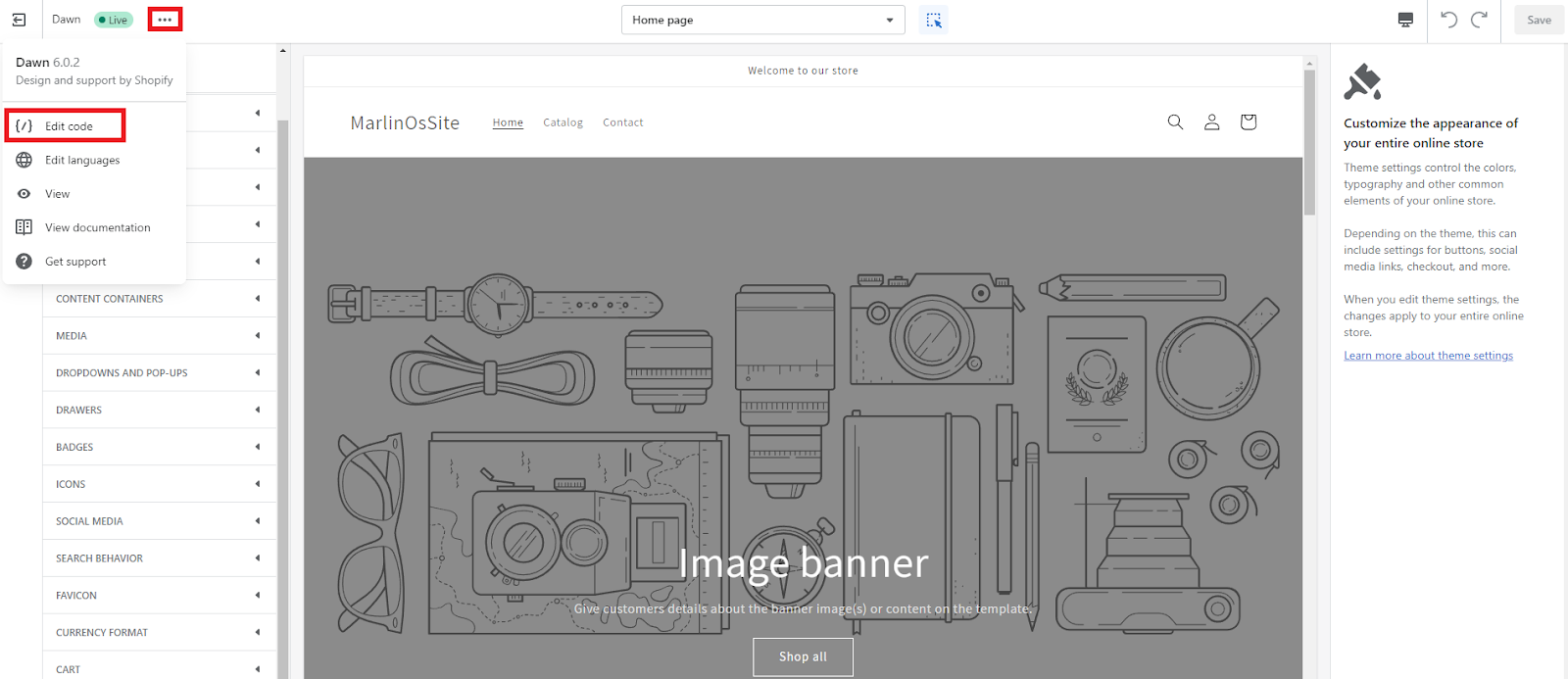
This opens another tab with all the files used in the theme.
- Find and select the file called theme.liquid under the folder Layout
- Scroll down in the file, then find and remove the following code snippet:
<script> window.addEventListener('CookieInformationConsentGiven', function (event) { if (CookieInformation.getConsentGivenFor('cookie_cat_marketing')) { if (!document.cookie.split(';').some((item) => item.trim().startsWith('ViaAds='))) { document.cookie = "ViaAds=; max-age=34560000; Path=/;"; } } else { document.cookie = "ViaAds=; Path=/; Expires=Thu, 01 Jan 1970 00:00:01 GMT;';"; } }, false); </script>
If Cookie Information is also to be removed from the site, find and remove the following code snippet as well:
<script id="CookieConsent" src="https://policy.app.cookieinformation.com/uc.js" data-culture="DA" type="text/javascript"></script>
- Select Save
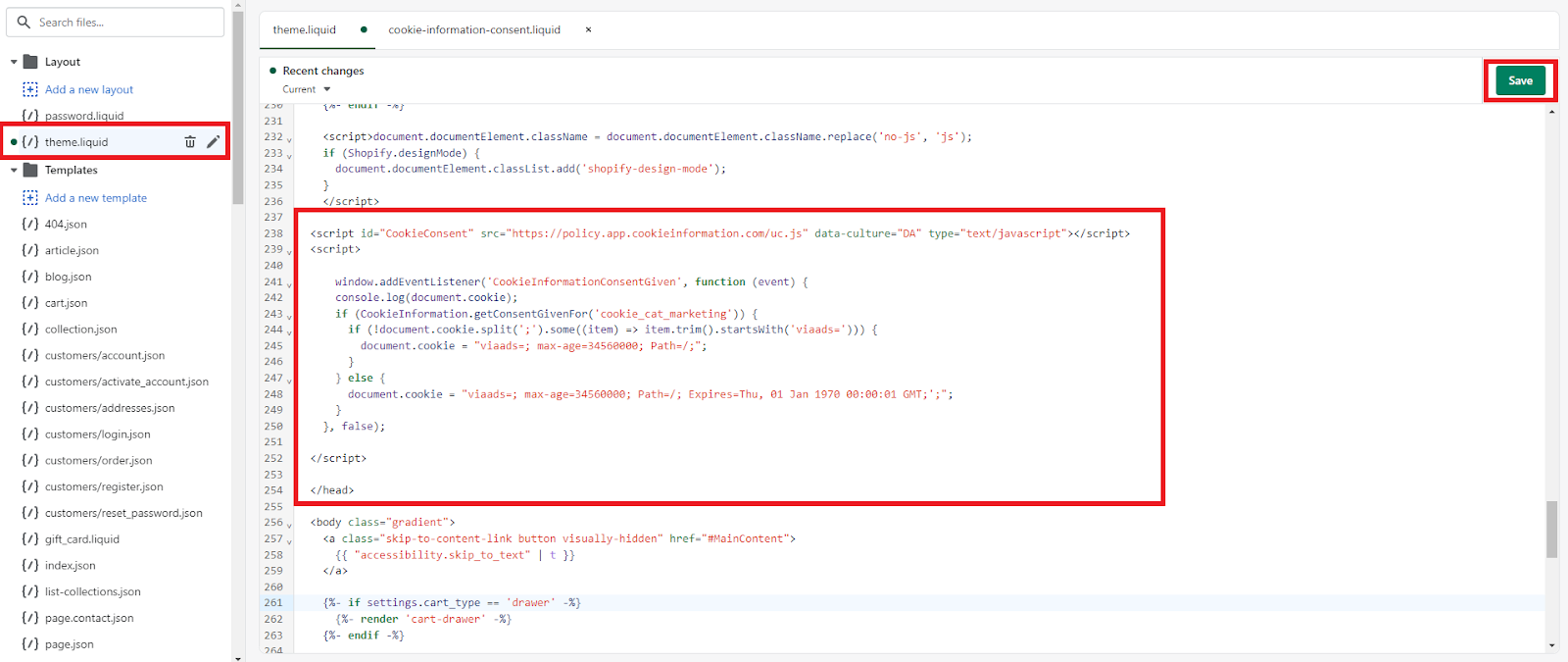
The ViaAds cookie script, and the Cookie Information script if applicable, are now removed from the webshop.
If the script was added as a Shopify Snippet:
- Select Themes in the menu under Online Store
- Select Customize under Current Theme
This opens the Theme Editor, where the current theme can be edited.
- Select the 3 dots in the top left-hand corner
- Select Edit Code
This opens yet another tab with all the files used in the theme.
- Find and select the file called theme.liquid under the folder Layout
- Scroll down in the file, then find and remove the following code snippet:
{% render 'cookie-consent' %}
Remove CookieBot:
- Select Themes in the menu under Online Store
- Select Customize under Current Theme
This opens the Theme Editor, where the current theme can be edited.
- Select the 3 dots in the top left-hand corner
- Select Edit Code
This opens yet another tab with all the files used in the theme.
- Find and select the file called theme.liquid under the folder Layout
- Scroll down in the file and find <head>
- Just below it, remove the following:
<script id="Cookiebot" src="https://consent.cookiebot.com/uc.js" data-cbid="cookie-bot-id" data-blockingmode="auto" type="text/javascript" defer></script>
- Then select Save
CookieBot is now removed from the webshop.
Magento - Uninstall Extension
- Connect via SSH to the root of the Magento installation (the folder that contains the App folder)
- Run the following commands:
php bin/magento module:disable ViaAds_Integration --clear-static-content
php bin/magento setup:upgrade
- If the ViaAds Extension is to be removed completely, run the following commands:
cd app/code/ViaAds/
rm -rf Integration
The ViaAds Extension is now disabled and, if you ran the second set of commands, removed from the webshop.
Magento - Remove scripts
- Select Content in the menu and Configuration in the submenu
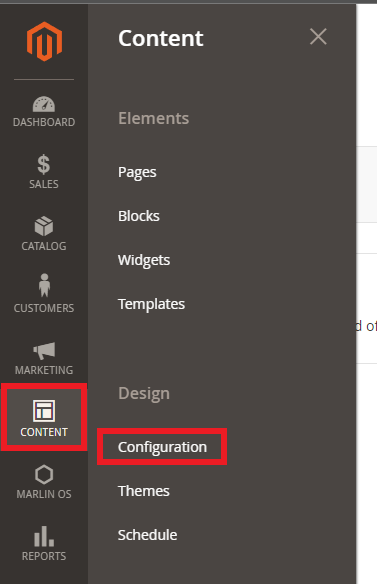
- Select Edit on the top line of the list

- Scroll down and find HTML Head and click it
- Now scroll down and find Scripts and style sheets
If the ViaAds script is included via Cookie Information, do the following:
- Remove the following script:
<script id="CookieConsent" src="https://policy.app.cookieinformation.com/uc.js" data-culture="DA" type="text/javascript"></script>
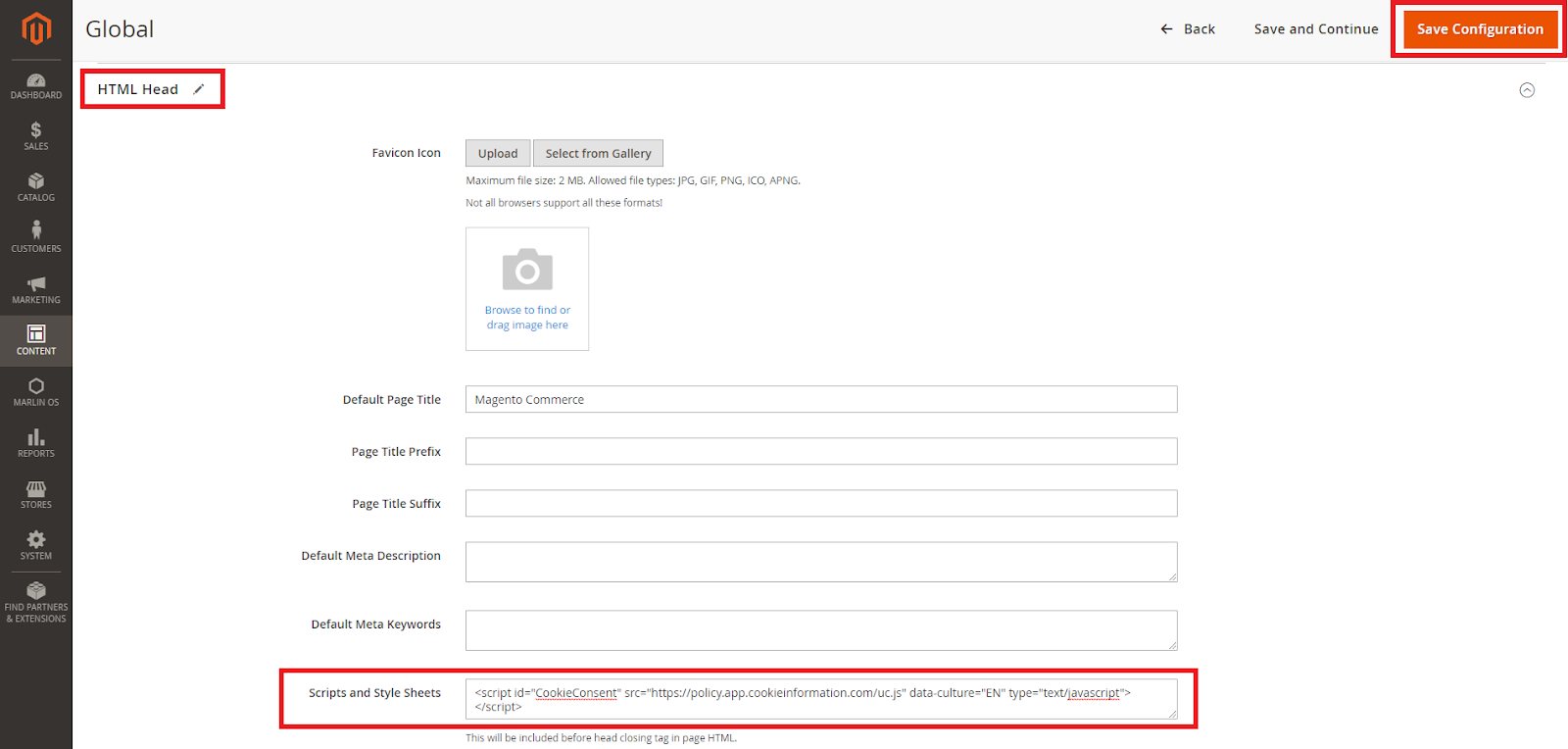
Cookie Information is now removed from the webshop.
If the ViaAds script is included via Magento, do the following:
- Remove the following script:
<script id="CookieConsent" src="https://policy.app.cookieinformation.com/uc.js" data-culture="DA" type="text/javascript"></script> <script> window.addEventListener('CookieInformationConsentGiven', function (event) { if (CookieInformation.getConsentGivenFor('cookie_cat_marketing')) { if (!document.cookie.split(';').some((item) => item.trim().startsWith('ViaAds='))) { document.cookie = "ViaAds=; max-age=34560000; Path=/;"; } } else { document.cookie = "ViaAds=; Path=/; Expires=Thu, 01 Jan 1970 00:00:01 GMT;"; } }, false); </script>
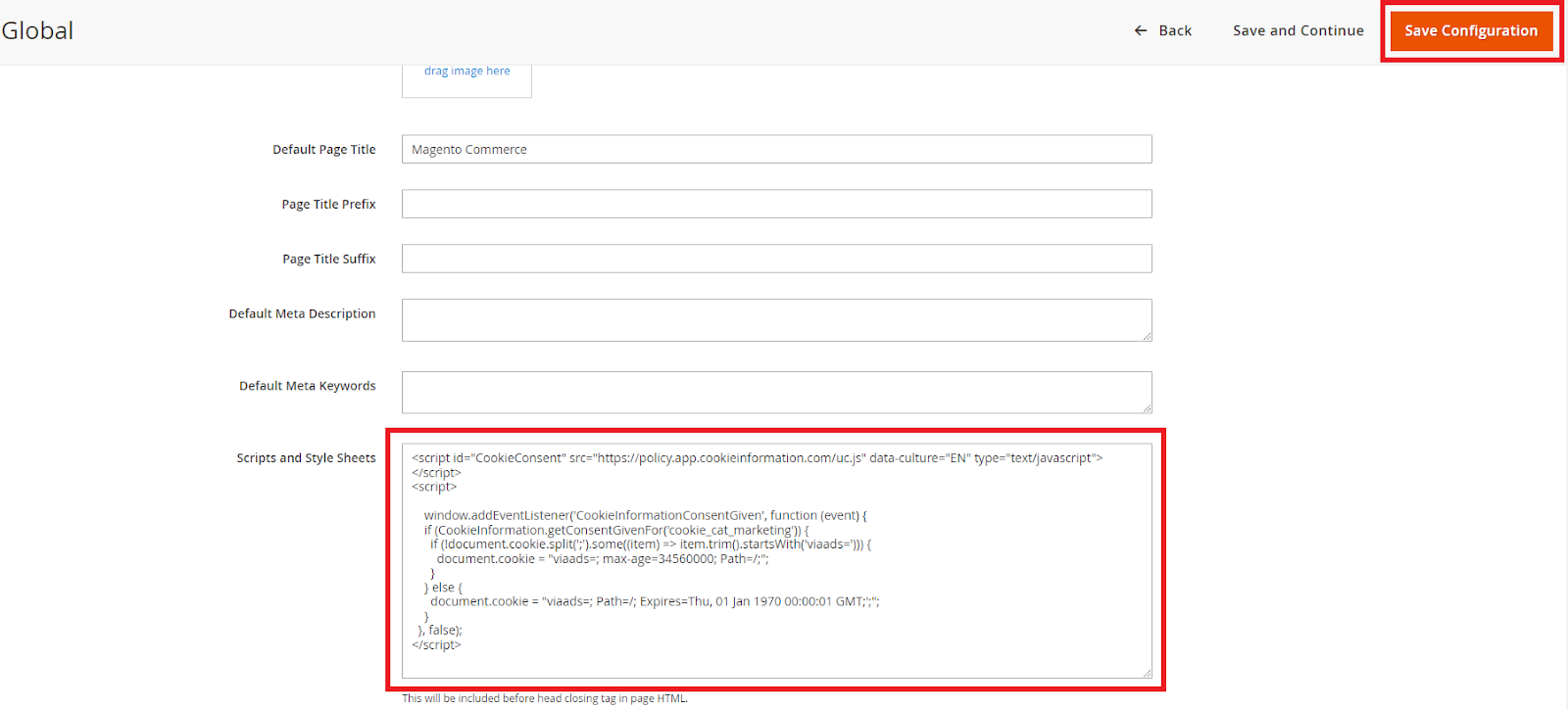
Cookie Information is now removed from the webshop.
WooCommerce - Remove Plugin
- Log in to the Admin control panel
- Navigate to Plugins
- Find ViaAds plugin and select Deaktiver (Deactivate)

WooCommerce - Remove script
If the ViaAds script was added in Cookie Information and Cookie Information is to remain active, do the following:
- Log in at app.cookieinformation.com
- Select the domain of the webshop the ViaAds script is to be removed from
- Select Pop-up
- Scroll down and click Advanced Settings
- Then scroll further down to the bottom of the page and find Javascript functions
- Scroll to the bottom of Javascript functions
- Now remove the following code snippet just above this line (if other functionality has been added here, you will need to search for the snippet and then remove it):
window.addEventListener('CookieInformationConsentGiven', function (event) { if (CookieInformation.getConsentGivenFor('cookie_cat_marketing')) { if (!document.cookie.split(';').some((item) => item.trim().startsWith('ViaAds='))) { document.cookie = "ViaAds=; max-age=34560000; Path=/;"; } } else { document.cookie = "ViaAds=; Path=/; Expires=Thu, 01 Jan 1970 00:00:01 GMT;';"; } }, false);
- Scroll up to the top of the page and select Save & Publish
- A pop-up opens with the text "Are you sure you want to save and publish changes?" - click Save
- The ViaAds script is now removed from the webshop